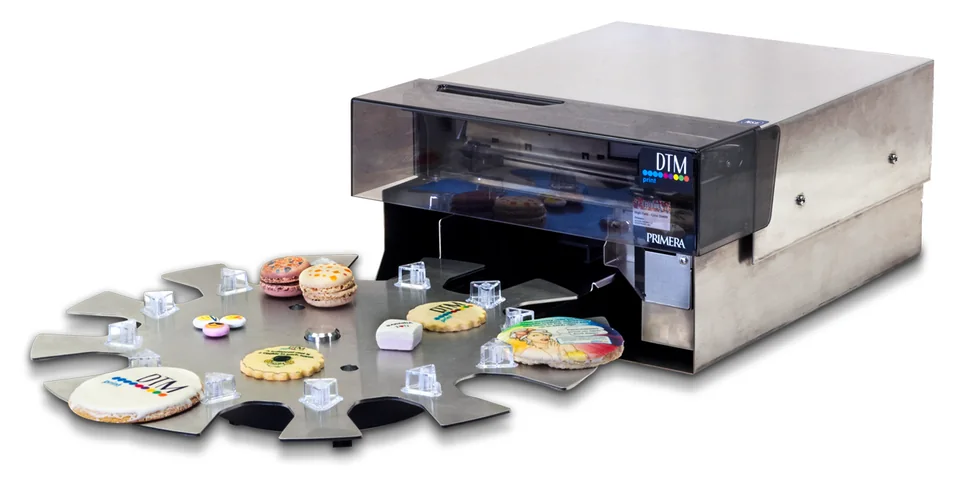
Your guests take a selfie, give it a veil or a crown and send it off. A few minutes later they are holding it in their hand, printed on a cookie. A party favour, a talking point and a keepsake in one, and it tastes good too.
Apply now Get in touch Rent an Eddie
How it works at your celebration
1. QR code on the table
On the table card, on a stand or next to the photo booth. The kiosk opens in the browser, no app needed, and speaks the language of the guest's phone.
2. Design the selfie
A photo from the gallery or straight from the camera. Add a wedding frame, a veil, a crown or heart glasses, plus a message for you.
3. Send it off
No guest pays anything. The kiosk runs in "free" mode because the cookies have been paid for in advance.
4. Print and collect
The Eddie prints the design. On their phone, guests can see when their cookie is ready and then pick it up.
Entirely in your style
- The "Wedding" look with matching colours, frames and decorations, ready to use as a template.
- Your names, your date, your motto appear on the start screen and as a text suggestion in the designer.
- Masks and decorations such as veils, tiaras, top hats, bow ties, rings or "Just married" are placed on the photo by guests with a finger.
- Your own frame, for example with a monogram, can be uploaded as an image.
- Cookie, heart-shaped cookie, macaron or chocolate disc: on every blank, your guests see in advance what their design will look like.
Why a cookie selfie?
A party favour with a face
Instead of sugared almonds in a little tulle bag, every guest takes their own design home, or eats it straight away.
Your photo booth gets a flavour
The keepsake photo is still there, and now there is a cookie too. The two complement each other rather than compete.
Everything within limits
You decide how many cookies there are in total and, if you like, how many per guest. Once the quota is reached, the kiosk stops taking orders.
Your guests' photos stay on the server only until printed and are then deleted automatically.
Try it yourself
Open the demo on your phone and design your first cookie. In the dashboard, switch to the "Wedding" template and see how quickly the celebration is set up.
Demo “Celebration”
Guests order for free because the host has paid in advance. This is how it works at weddings, corporate events and birthdays.
Dashboard login: user demo, password demo. The demos reset every night, so feel free to try everything. At a stall or a trade fair? The overview with QR codes opens the kiosk straight on your phone.
Who brings canprintweb to your wedding?
canprintweb comes through the suppliers you are probably booking anyway: photo booth hire businesses, caterers, wedding planners and venues. Ask them about it or get in touch and we'll help you on your way.
Do you offer weddings yourself? Then add the cookie selfie to your range.
We offer different models: per cookie, short-term rental or subscription. There is something for everyone – just talk to us.
Frequently asked questions
Do guests need an app?
No. The kiosk runs in the browser, the QR code is all they need.
Do guests have to pay?
At weddings, usually not: the cookies are paid for in advance and the kiosk is free for guests. If you prefer, you can also run it with payment on the guest's phone.
What does it need on site?
A Primera Eddie, a Windows PC with internet and the blanks. Guests order with their own phones.
Can guests from abroad use the kiosk too?
Yes. It speaks nine languages and greets every guest in the language of their phone.
More about canprintweb
- Kiosk for guests – From QR code to collection number, no app needed.
- Dashboard – Your market day at a glance, on your phone too.
- Design and languages – Eight seasons, your logo, nine languages.
- Payments and invoices – Your money goes straight to your account.
- Printer and stall – Primera Eddie, Windows PC, done.
- Videos – Every setup step, one short video at a time.
- FAQ – Costs, printer, internet, data protection.
Use cases
- Wedding – The cookie selfie as a party favour.
- Corporate event – Your logo, your people, one cookie.
- For photo booth hire businesses – The add-on for your case.
- For caterers – The dessert everyone talks about.
Cookie selfies for your wedding guests? Per cookie, short-term rental or subscription: there is something for everyone.